
Here, I'll be your guide thanks to the magic of internets.
Happy hacking and learning, have fun, and hit me up if you encounter any issues with the site or have ideas on ways I can improve the course.
 logo on top of pages to return here at any time. All the lessons are listed below:
and you can jump directly to any lesson (I do recommend going through them in order once).
If you are registered and are seeing
 buttons, make sure you login and they should go away.
completed
Start Here
Let's go! What, where, how
Start HERE! The project we'll do, getting the most out of this, and where to go next.
completed
Beginner Project
New to KiCad? Come in!
A quick tour doing a tiny, but full, project with schem and printed circuit board in just a few minutes
completed
Setting Up
Set up and start
We'll setup our basic settings and project space
completed
Version Control
4 ways to git for change tracking

For collaboration and saving your butt!
completed
Planning + Arch
Making a plan and designing architecture
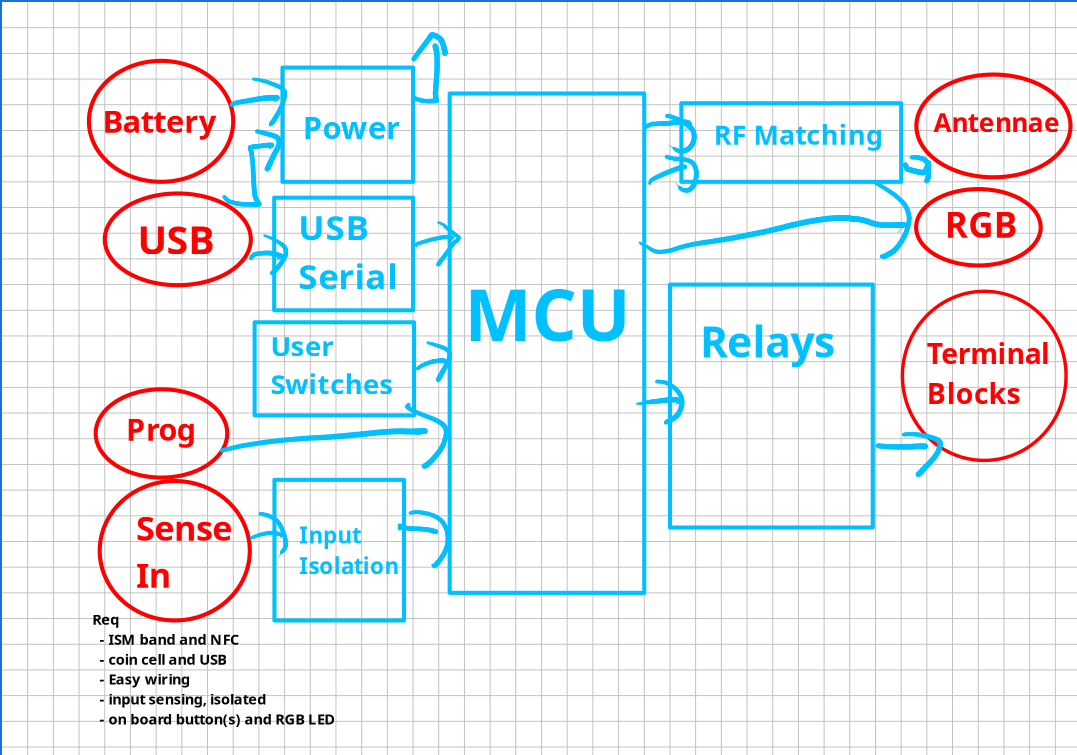
Hardware to play with, requirements and architecture
completed
Great Schematics
Rules for rockin' schematics
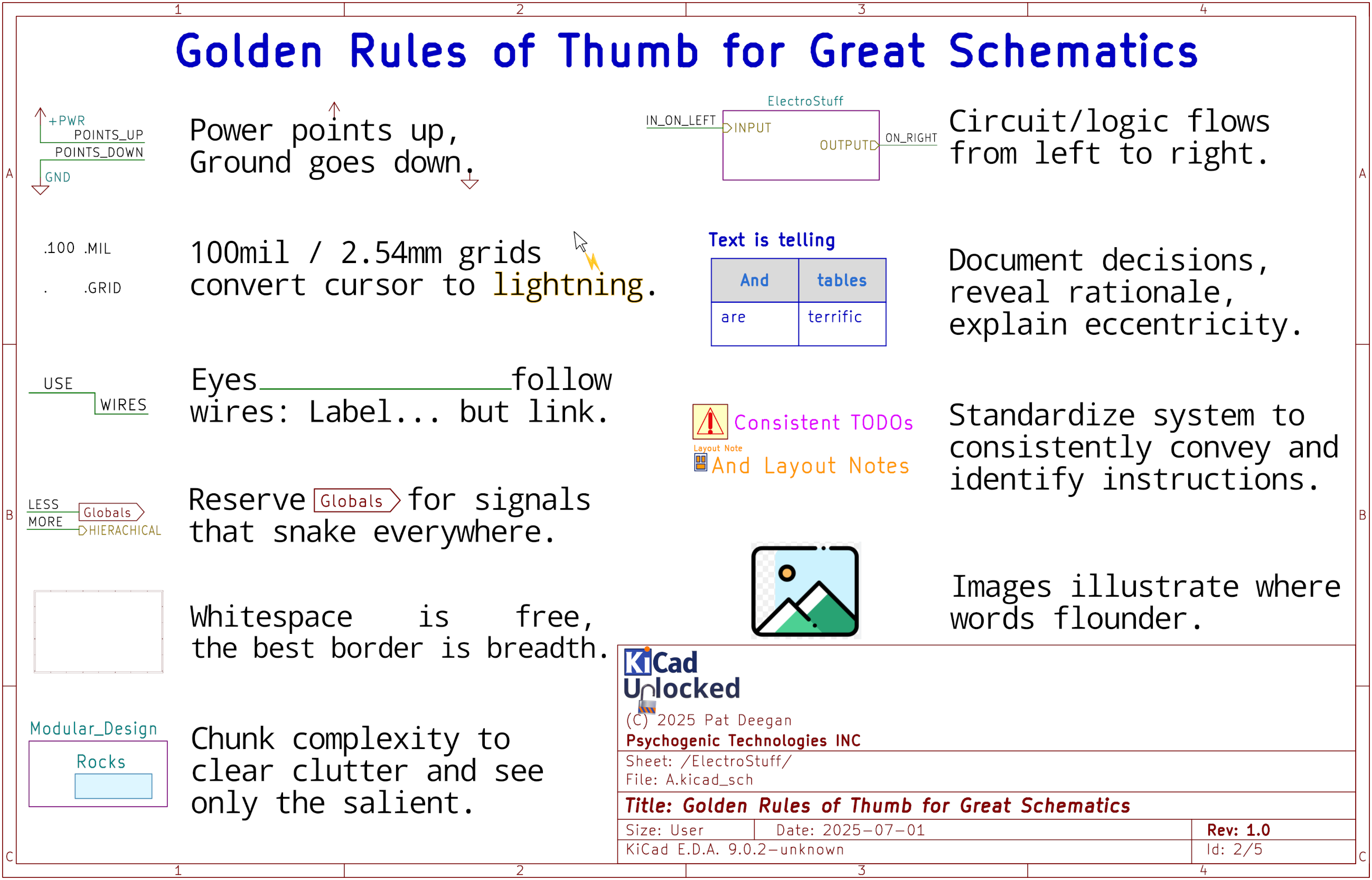
Schematics are about communicating and this gets into how I use KiCad to create great schematics
completed
Hierarchies
Cool ways to leverage hierarchical sheets
Three ways to use magical modularity
completed
Kicad Flow
THE tool to stay in the zone for Maximum KiCad
A key element to flow with KiCad
completed
Adding Components
A lot more to adding components

The surprising depth of symbol adding: more interesting than you'd have thought
completed
Nets and Labels
Labels: make things clear and all sorts of magic
We'll cover the why and how of 4 out of the 5 types of labels
completed
Buses
Jump on the bus: bundles of wires carry heavy loads
Reduce clutter, increase clarity: we finish the arch thanks to buses
completed
Buses II
Bus aliasing and some useful tricks
Putting aliases into action wiring up term blocks and annotation symbols
completed
Power and USB
Wiring up power reg and switchover, and USB
Laying down our first circuits
completed
ERC
Avoid dumb mistakes
Getting to know and using ERC
completed
Net Classes
Grouping signals by type 
Helps in routing PCBs and also clarifies schematics
completed
Serial + Switches
USB serial and debounced switches
All walk-through here, as we lay down some interesting circuitry for the CP2102 USB to serial chip and a couple of on-board switches.
completed
Custom Footprints
How symbols map to reality and making our own
completed
Symbol Units
Some symbols are split into many units
This can make the layout more logical but comes with some minor caveats. The walk-through also introduces net ties while wiring up the...
completed
Custom Symbols
Getting and storing custom symbols
Where to get symbols and building up your custom libs
completed
Custom Symbols II
Fast creation, units, alternate pin functions

Making the nRF54L MCU symbol, using a host of tricks and features to do it easily and leverage all the latest KiCad cool, discussed...
completed
Quicker Symbols
Dropping symbols in half the moves
A little hack that saves a few clicks for every resistor, capacitor and inductor dropped in a schem...
completed
Syms from Scratch
Datasheet to symbol
There's a (way) better way to create custom symbols by hand, even if starting with just a datasheet
completed
Net Classes II
Directive labels and rule areas
Allow effective communication and ease
completed
BOM Checks
Using the BOM 
More than just for ordering parts
completed
Schem Fixes
Passing ERC
Finishing up the schem and making ERC happy
completed
Schem To PCB
Moving to the next phase
Closing schem and dangling bits to cover
completed
Layout Phases
The big four of layout
Getting physical and in shape
completed
PCBnew Setup
Setting up the playground
From absmax to classy nets
completed
Constraints
Clinching constraints
Choose constraints and netclasses well and life will be grand
completed
Floorplanning
The floor plan
Why and how to make it real efficiently
completed
Placement Party
Filling the floor
Placing everything in the exact right spot
completed
Max Trax
Tracing Tracks
The zen of clearing out ratsnests
completed
Special Tracks
Diff Pairs, Tuned Tracks
Some wires are more sensitive than others
completed
Custom Rules
Custom Rule Them All
So much more than DRC: master crazy powerful custom rules.
completed
Zone Fills
Fill-Anthropy
Copper pours: reasons to use them and how to do it
completed
Indications
Suggestive Silk
Make your boards self documenting, add logos and artwork
completed
Fabrication
Getting the boards made
Communicating the design for fab
completed
Assembly
Getting it built
Parts, placement and squeezing into enclosures
completed
Wrap and Next
Finish and Next Steps
Wow!